
Apex Legends is continuing Season 25 with fresh events, new modes, balance changes, and more with the mid-season update. The new patch brings tons of buffs and nerfs to shift the current meta in the game. There will be a new Future Icons Event with the new update, new Arena: Duals mode, new skins, and more.
Apex Legends’ Season 25 Split 2 is now live and brings exclusive Twitch Drops rewards. Rewards from Twitch Drops include exclusive weapon charms and skins. You can earn the rewards by watching Drops-enabled streams and your favorite Apex Legends streamers. However, there are two different types of rewards available. Some rewards require you to have a subscription in order to get them. Moreover, you will need to connect your Twitch and EA accounts to claim the rewards.
We got you covered with everything you need to know about Apex Legends Season 25 Split 2 Twitch drops and how to claim them all.
Apex Legends Season 25 Split 2 Twitch Drop End Date
Apex Legends Season 25 mid-season update is live and includes new Future Icons Event and a new Arena mode. There are also exclusive Twitch Drops live from June 24 and will run through July 22, 2025. You have till July 22 to claim all the rewards.
How to get all Apex Legends Season 25 Split 2 Twitch Drops
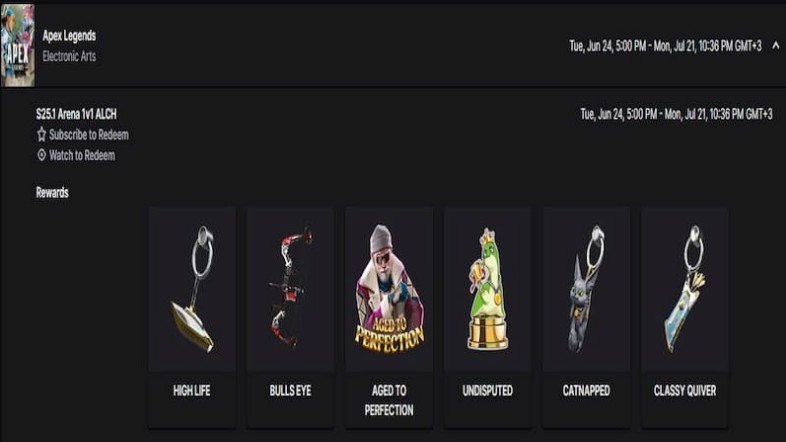
There is a total of six exclusive Twitch drops for Apex Legends Season 25 Split 2. However, not all rewards are free to claim just by watching time. Some require buying a subscription. Here are all the rewards you can get.
- High Life Weapon Charm
- Bullseye Bocek Skin
- Aged to Perfection Holospray
- Undisputed Sticker
- Catnapped Weapon Charm
- Classy Quiver Weapon Charm
Subscription Twitch Drop Rewards
To get these Apex Legends rewards, you need to buy 3 new or gift subs to any drops-enabled Apex Legends streamers.
- High Life Weapon Charm
- Bullseye Bocek Skin
- Aged to Perfection Holospray
- Undisputed Sticker
Watch Time Rewards
The free rewards from Apex Legends Twitch drops require you to watch 30 minutes of a stream to get them.
- Catnapped Weapon Charm
- Classy Quiver Weapon Charm
How to Connect Twitch and EA Accounts and Claim Rewards
Tune in to Twitch streams that have drops enabled. You can tune in your favorite streamer and complete the watch time criteria to get the rewards.
You can follow these drops to get your rewards from Twitch for Apex Legends.
- Open Twitch on a browser of your choice, or on your phone.
- If you do not have an account, proceed to create an account on the platform. If you have an account, you can directly log in.
- After logging in, proceed to head to the “Apex Legends” section of Twitch through their home page.
- Navigate to the streams of any Apex Legends content creator of your choice. Ensure that their stream has the “Drops-enabled” tag on it.
- Now, proceed to watch the stream till you fulfill the watch time requirements for the in-game spray and the Lifeweaver Epic-rarity skin.
- Once they’re done, go to the top-right corner of the Twitch website or mobile app and click on the profile icon. You’ll be met with a drop-down menu. From here, click on the “Drops & Rewards” tab.
- This will open a new window. Go to the “Inventory” section of this page, and proceed to click on the “claim” button against the Apex Legends drops.
However, these are exclusive Apex Legends Season 25 Split 2 rewards and will not ever return. So, if you’re a collector, be sure to connect your accounts and tune in to Twitch to claim all the rewards.
That’s all you need to know about how to get all the Apex Legends Season 25 Split 2 rewards.